Chamberlain Group says a door that reaches the floor and then reverses often has too much DOWN travel, though a door problem or, more rarely, a logic-board issue can produce similar behavior. Confirm the door is mechanically sound, then reduce/learn DOWN travel using the exact model procedure and test safety reversal afterward.
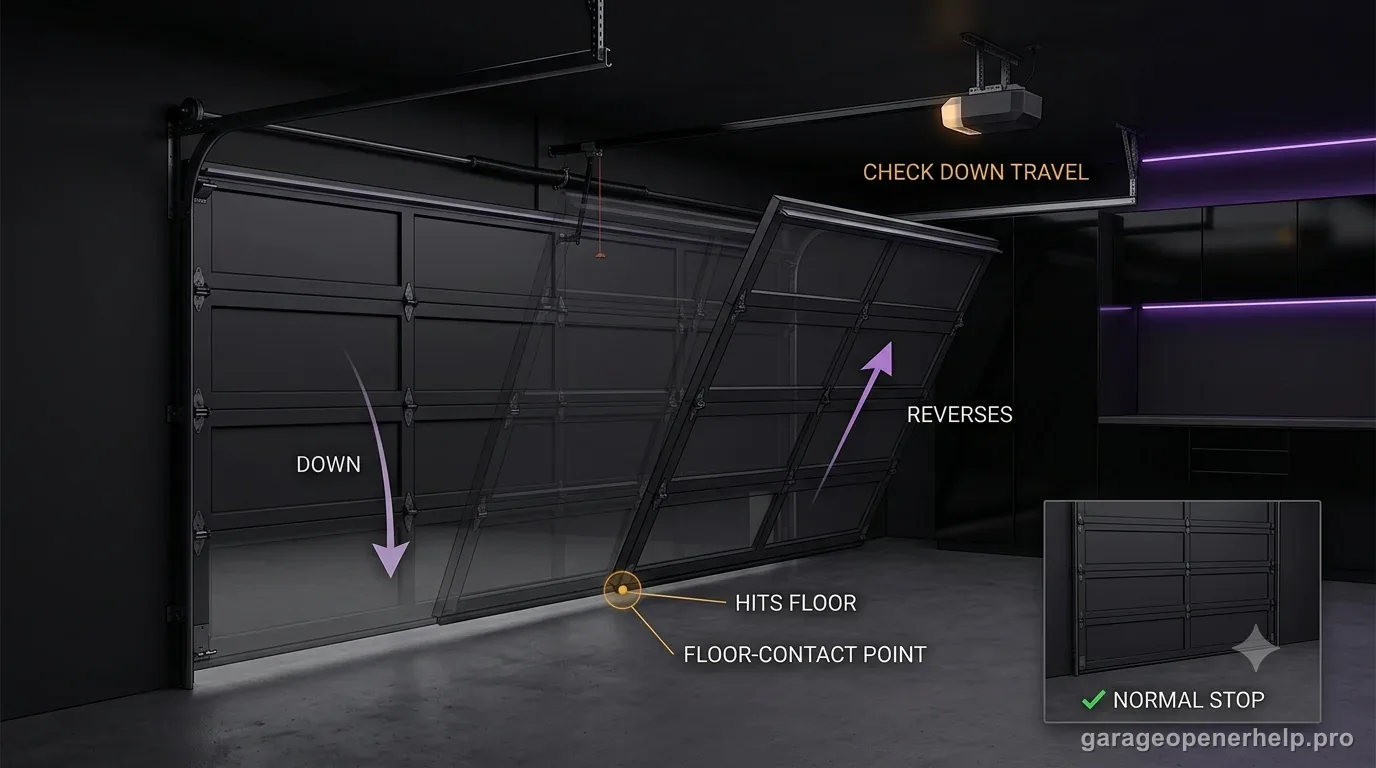
Separate a reversal above the floor from one after floor contact
Does the bottom seal touch the floor before the opener reverses?
That observation changes the troubleshooting branch. A reversal above the floor keeps sensors, obstruction, resistance and model-specific force/travel behavior in play. Clear floor contact followed by reversal makes excessive DOWN travel a stronger clue on Chamberlain Group guidance, after mechanical resistance is ruled out.
Separate UP, Adjustment and DOWN controls during travel learning
Which button changes position, and which button saves it?
On the documented Security+ 2.0 / myQ travel-learning sequence, UP and DOWN move the door to the desired positions while the Adjustment button saves each position. After travel is learned, the opener performs automatic force setup and the safety reversal system must be tested.
What you are likely to notice
- The bottom seal visibly contacts the floor before reversal
- The door immediately travels back upward after compressing at the floor
- The symptom repeats at the fully closed position rather than higher in the opening
Check these in order
1. Confirm it truly contacts the floor first
Watch from a safe position and distinguish floor contact from a reversal that happens an inch or more above the floor. This distinction matters: Chamberlain specifically identifies excessive DOWN travel as a common cause when the door hits the floor and then reverses.
2. Make sure the floor and door are not creating abnormal resistance
Check for debris, a shifted threshold, frozen seal, damaged bottom fixture or a door that is binding near closed. Do not use a travel adjustment to hide a mechanical problem.
3. Correct DOWN travel using the exact control type
Depending on opener generation, limits may use manual screws, black/purple or black/yellow buttons, or modern UP/DOWN adjustment buttons. Reduce the closed position only according to the exact model instructions.
4. Re-test safety reversal
Chamberlain requires a safety-reversal test after travel changes. The purpose of the adjustment is to stop the door correctly at the floor while preserving the opener’s ability to reverse when it encounters an obstruction.
Floor contact makes DOWN travel a stronger clue
When you can clearly see the door reach the floor, compress the bottom seal and then reverse, Chamberlain Group lists excessive DOWN travel as a common reason. The opener may be trying to move the door beyond the true closed position, interpreting the resulting resistance as a reason to reverse.
That does not mean every floor-contact reversal is solved by a limit change. Chamberlain also lists a door problem and, more rarely, a logic-board issue. The door must still move normally and the closing surface must be clear.
Adjust the closed position, not the safety system
The proper target is a closed position where the door seals against the floor without the opener continuing to drive downward. Follow the exact model's DOWN travel/limit procedure; the interface can be screws, colored buttons or UP/DOWN controls depending on generation.
Do not try to solve the symptom by defeating the photo eyes or by adding excessive force. Those actions change safety behavior rather than correcting the learned stop point.
A post-adjustment reversal test is mandatory
Chamberlain's documentation repeatedly requires the safety reversal test after travel changes. That is because an incorrect travel setting can interfere with how the reversal system performs. A door that now closes but fails the test is not fixed.
If correct DOWN travel will not remain learned, use the separate travel-limits-won't-save diagnosis. If travel saves correctly but the door still presses into the floor and reverses, the issue needs model-specific service.
Look for a change that explains why the closed point moved
If the opener used to close correctly and suddenly began driving into the floor, ask what changed: a travel reprogram, logic-board/opener replacement, door service, new floor coating/threshold, or a reset after power/service work. A changed learned position is more plausible when the symptom starts immediately after setup work.
If nothing changed and the door now needs noticeably more pressure to reach the floor, inspect the mechanical closing path instead of assuming the stored limit moved by itself. A shifted track, damaged bottom hardware or binding near closed can create a similar resistance event.
How much seal compression is normal? Do not guess from force
The goal is not to make the motor push until the weather seal looks maximally compressed. The door should reach the intended closed position without the opener continuing to drive hard downward. Exact geometry varies by installation, so the opener's model-specific limit procedure and the door manufacturer's setup matter more than a universal compression rule.
After correction, run several normal cycles and the required reversal test. A symptom that disappears once but returns on the next cycle may indicate limits that are not being retained, which belongs in the separate travel-learning diagnosis rather than another round of DOWN adjustment.
Stop DIY troubleshooting when…
- The door or bottom hardware is damaged
- The door continues to press hard into the floor after correct travel setup
- The safety-reversal test fails
- The problem persists with correct travel and a mechanically healthy door
Garage door springs, cables and a falling/unbalanced door can store or release dangerous force. Those are door-system problems, not just opener settings.
Common questions
Why does my garage door hit the ground and go back up?
Chamberlain Group says excessive DOWN travel is a common cause when the door physically reaches the floor first. Door problems and, more rarely, opener electronics can also cause similar behavior.
How do I know this is different from an early reversal?
Watch whether the bottom seal actually contacts/compresses against the floor before the opener reverses. If it reverses above the floor, use the early-reversal diagnostic path instead.
Do I need to test the safety reversal after changing travel?
Yes. Chamberlain requires the safety reversal test after travel adjustments because incorrect limits can interfere with the protective system.
Manufacturer sources used
These links are the factual baseline for the diagnostic claims above. Model-specific manuals can supersede general guidance.