On the documented Genie Excelerator family, two repeating status-light blinks mean a controller board interrupt. Genie instructs owners to remove power, wait about five seconds, restore power and operate the opener from the wall console. If the two-blink code returns, Genie's chart points to the ribbon-cable connection between the motor drive board and controller board, which is an internal electronics/service branch rather than a reason to adjust sensors, force, or travel at random.
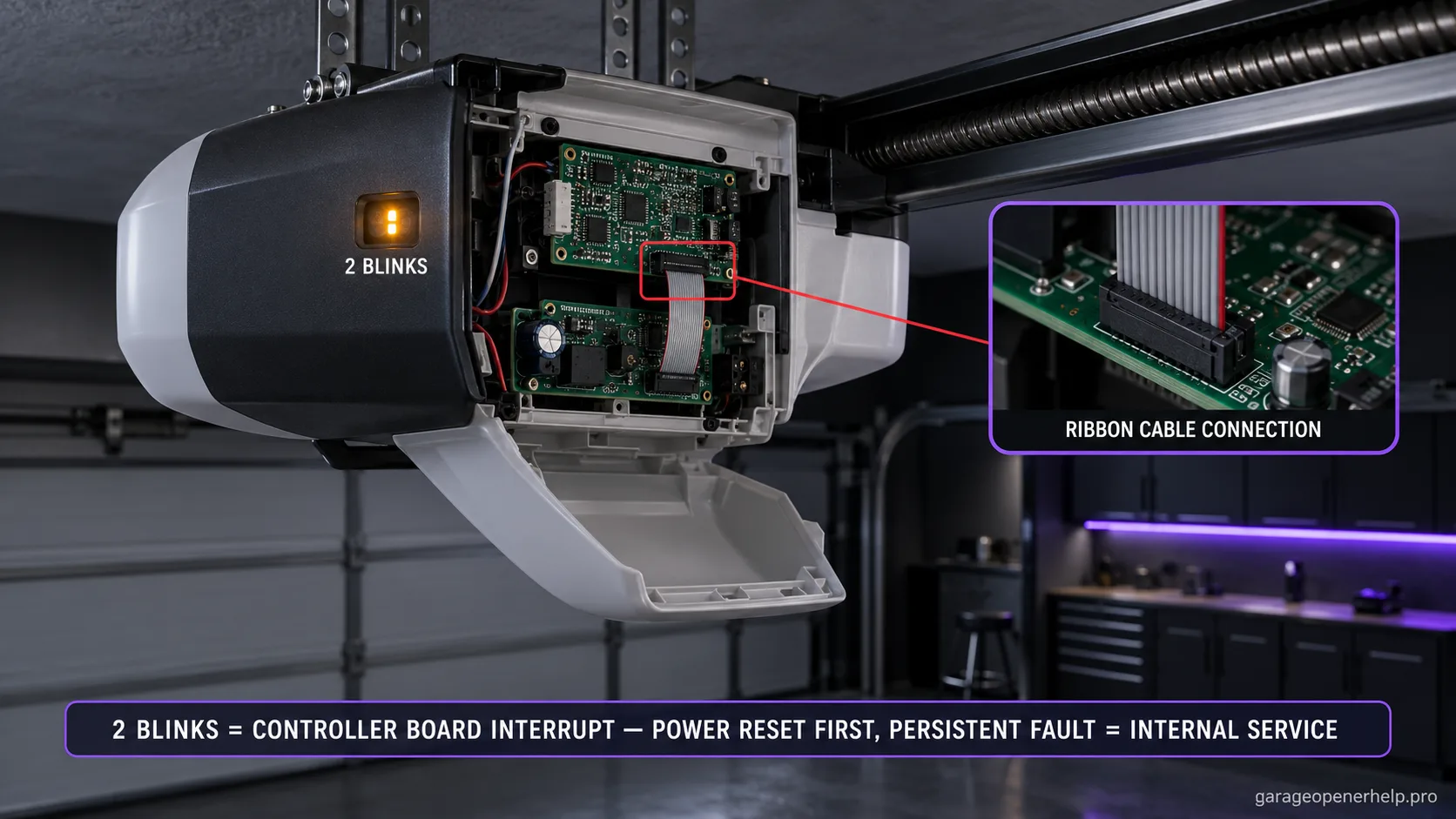
Diagnostic snapshot
- Answer
- Two repeating Genie Excelerator status-light blinks mean a controller board interrupt.
- Check first
- Perform the manufacturer five-second power reset once and record whether normal operation returns.
- Strong clue
- A persistent two-blink code after the documented reset keeps the diagnosis in Genie's controller-board/interconnect service branch rather than sensor or remote troubleshooting.
- Model / generation note
- This code belongs to the Excelerator self-diagnostic chart; two green powerhead blinks on 1022/2022-family units mean something different.
This exact manufacturer signal can feed the following diagnostic family. Keep the original code or LED pattern when troubleshooting.
What you are likely to notice
- The Excelerator status light blinks twice, pauses, then repeats
- The opener may fail to respond normally even though no Safe-T-Beam code is shown
- A brief power reset may restore normal behavior
- The code can return when an internal controller/interconnect problem remains
Check these in order
1. Verify the Excelerator two-blink status light
Do not reuse this meaning for a Genie Safe-T-Beam red LED or for the green two-blink powerhead code on 1022/2022-family units. Excelerator has its own self-diagnostic chart, and two blinks on that chart specifically identify a controller-board interrupt.
2. Perform the manufacturer reset once
Genie directs a simple reset: disconnect normal opener power, wait about five seconds, restore power and operate the unit from the wall console. Note whether the opener returns to normal immediately, fails again on the first cycle, or changes to a different diagnostic pattern.
3. Rule out the wrong branches before buying parts
A two-blink Excelerator code does not tell you to align the Safe-T-Beams, reprogram remotes, change force, or move limit switches. Those actions can add new variables without addressing the controller interrupt. Preserve the code and exact model instead of trying unrelated fixes.
4. Treat persistent board/interconnect checks as service work
For a code that does not clear, Genie points to the ribbon-cable connection between the motor drive board and controller board and identifies the controller board in the diagnostic chart. Because those components are inside the opener, stop at documenting the model, code and reset result rather than attempting live internal-board diagnosis.
Why two blinks should narrow—not widen—the troubleshooting
Genie defines two Excelerator blinks as a controller board interrupt. That makes remote programming, Safe-T-Beam alignment, force adjustment, and limit-switch movement poor first responses unless another independent symptom points there. A precise diagnostic code is valuable because it prevents unrelated changes from contaminating the evidence.
The manufacturer starts with a brief power reset. If the code persists, the chart names the ribbon-cable connection between the motor drive board and controller board. That is a clear handoff boundary from homeowner observation to internal electronics service.
A reset that works once is still worth documenting
If the opener operates normally after the five-second power reset, note how long the recovery lasts and what action makes the two-blink pattern return. An intermittent controller interrupt that appears only during motion can be more useful to service than a vague report that the opener 'sometimes dies.'
Avoid repeatedly resetting the opener until the fault disappears for a day. Repeated resets can erase the timing and operating condition that made the interruption reproducible.
What not to buy yet
A two-blink Excelerator code does not, by itself, justify buying new remotes, Safe-T-Beams, a wall console, or limit-switch hardware. Those components have separate diagnostic patterns in the same Genie chart. The board/interconnect branch should be confirmed at the exact-model service level before ordering legacy electronics.
Legacy boards can vary by opener revision. Photograph the full model label and any existing board/part information that a qualified technician exposes during service rather than relying on marketplace compatibility claims.
Why internal ribbon-cable language matters even when DIY stops there
Genie's internal-cause wording is useful even when the DIY path stops there. Knowing that the manufacturer points to the controller-board interconnect explains why sensor realignment or remote reprogramming is not the next rational step.
It also makes the service handoff better: exact model, two-blink code, reset result, and whether operation returns are enough to start a focused conversation without opening the powerhead while it is energized.
Stop DIY troubleshooting when…
- Two blinks return after the manufacturer reset
- There is visible heat, burn odor, corrosion, or board damage
- The opener trips a breaker or behaves unpredictably after power is restored
- Any check would require opening or probing internal powered electronics
Garage door springs, cables and a falling/unbalanced door can store or release dangerous force. Those are door-system problems, not just opener settings.
Common questions
What do two blinks mean on a Genie Excelerator?
Genie defines two repeating blinks as a controller board interrupt.
Can I reset it?
Yes. Genie's chart starts with removing power for about five seconds, restoring power, and operating from the wall console.
Should I replace the safety sensors for two blinks?
Not from this code alone. Excelerator two blinks point to the controller-board branch, while Safe-T-Beam faults have separate diagnostic signals.
Manufacturer sources used
These links are the factual baseline for the diagnostic claims above. Model-specific manuals can supersede general guidance.