For Genie models 1022, 1024, 1042, 2022, 2024, 2042 and 2027, two green powerhead LED blinks followed by a pause can mean the UP limit is not fully programmed, a wire/connection at the powerhead is bad, the Safe-T-Beam sensors are misaligned, or the beam is continuously obstructed. Because Genie's official chart lists several causes, the blink count is a branch selector—not proof that one sensor, wire, or control board should be replaced.
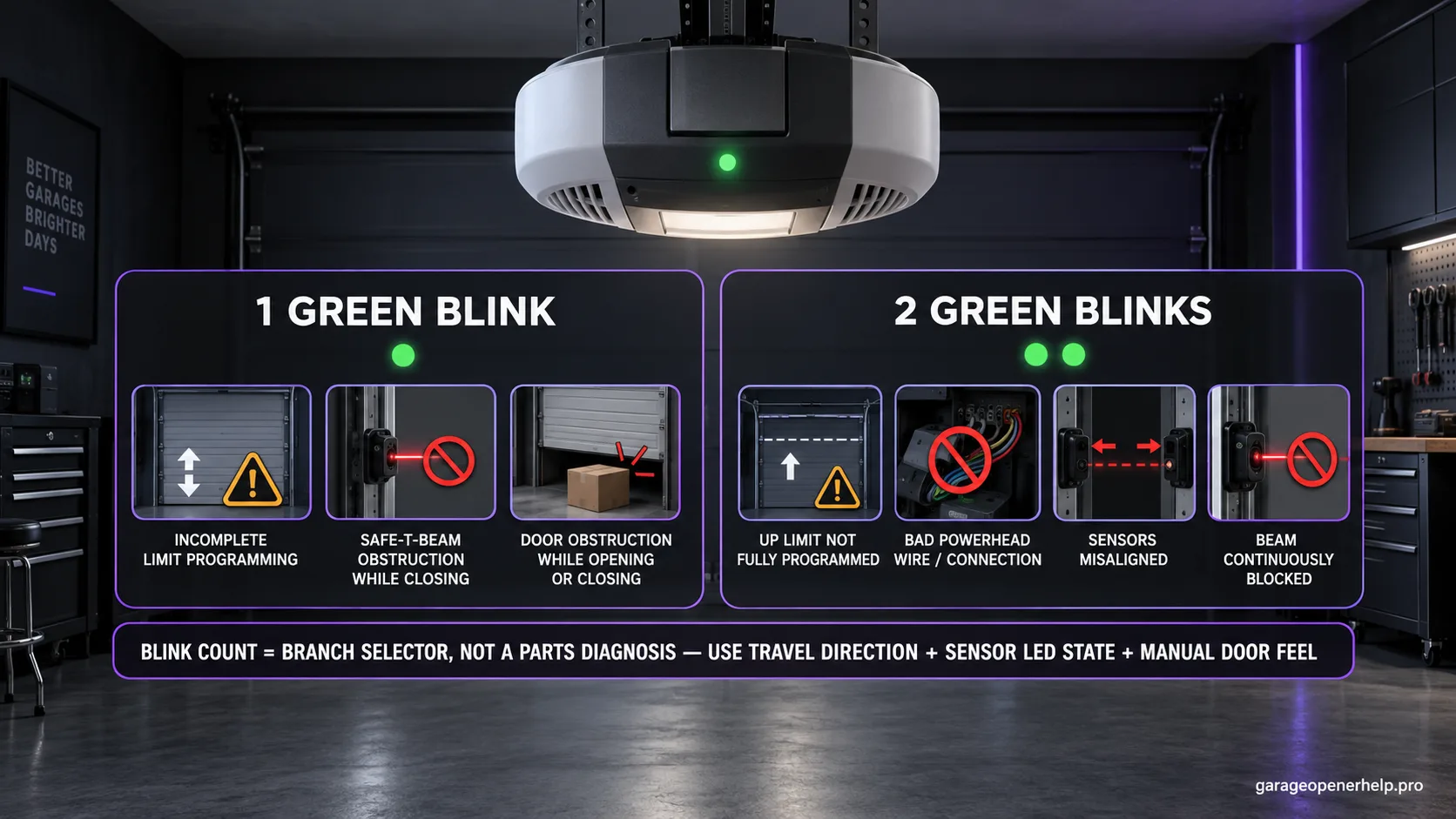
Diagnostic snapshot
- Answer
- On Genie 1022/1024/1042/2022/2024/2042/2027 openers, two green powerhead blinks can mean incomplete UP-limit programming, a bad powerhead wire/connection, sensor misalignment, or continuous Safe-T-Beam obstruction.
- Check first
- Verify UP-limit setup, then read the Safe-T-Beam pair and inspect only accessible low-voltage wiring/connections.
- Strong clue
- A normal stable sensor pair weakens the beam branch, while recent limit clearing makes incomplete UP-limit programming more consistent.
- Model / generation note
- This is not the Safe-T-Beam two-red-blink code and not the Excelerator two-blink controller-board code.
This exact manufacturer signal can feed the following diagnostic families. Keep the original code or LED pattern when troubleshooting.
What you are likely to notice
- The green powerhead LED blinks twice, pauses, then repeats
- UP-limit setup may be incomplete or recently cleared
- The Safe-T-Beam pair may show misalignment or continuous obstruction
- Visible low-voltage wiring or powerhead connections may be loose or damaged
Check these in order
1. Keep this separate from Safe-T-Beam two red blinks
This page is about two GREEN blinks on the powerhead of the listed Genie opener family. The Safe-T-Beam sensors have a different red/green LED table where two red blinks have their own meanings. Identify the indicator location before troubleshooting.
2. Verify whether the UP limit is incomplete
Genie lists incomplete limit programming and specifically says to set the UP limit. If setup was recently cleared or never finished, follow the exact model manual rather than moving mechanical stops or changing force. If the opener already knows both endpoints reliably, this branch becomes less consistent.
3. Read the Safe-T-Beam state and clear continuous obstruction
The official chart also lists sensor misalignment and continuous Safe-T-Beam obstruction. Inspect the beam path, clean/aim the photo eyes without bypassing them, and use the sensor pair's own diagnostic LEDs to decide whether the beam branch is actually active.
4. Inspect only accessible wiring and connections
Genie also lists a bad wire to the powerhead or bad connection at the powerhead. Check visible low-voltage wiring for cuts, crushed insulation, loose accessible terminals or recent disturbance. Do not open powered electronics or turn a broad two-blink code into an unsupported logic-board diagnosis.
Why two green blinks need a discriminator instead of a single answer
Genie lists four broad causes under two green powerhead blinks: incomplete UP-limit programming, a bad wire/connection at the powerhead, Safe-T-Beam misalignment, and continuous Safe-T-Beam obstruction. The diagnostic value comes from combining the blink pattern with setup history, sensor LEDs, and visible wiring evidence.
A recently cleared UP limit is very different evidence from a receiver sensor that loses its normal LED state. Keep those facts separate before changing anything.
UP-limit history can remove unnecessary sensor work
If the opener was installed, serviced, or had travel settings cleared and the UP endpoint was never completed, follow the exact model's setup procedure first. The manufacturer explicitly lists incomplete UP-limit programming. If both endpoints were previously stable and no settings work occurred, that branch becomes less compelling.
Do not move rail hardware or mechanical stops to imitate an electronic limit procedure. Use the owner's manual for the exact family.
The sensor pair turns a broad code into a better diagnosis
Misalignment and continuous Safe-T-Beam obstruction are both manufacturer-listed causes. Read the red/green sensor pair while the two-green-blink powerhead code is active. A visibly blocked beam or abnormal receiving LED makes the safety branch stronger; a normal stable pair pushes attention back toward setup or wiring.
Never bypass the photo eyes to prove the theory. After any correction, complete the manufacturer's safety-reversal test.
What 'wire to the power head' does and does not tell you
Genie's public troubleshooting page says a wire to the powerhead or connection at the powerhead can be bad. That supports inspection of accessible low-voltage wiring and terminals, but it does not identify a specific internal board as failed. Keep the diagnosis at that evidence boundary unless model-specific service documentation goes further.
If visible wiring is intact, the sensor state is normal, and UP-limit programming is complete yet two green blinks persist, preserve the model, code, setup history, and observations for Genie support rather than inventing an internal component diagnosis.
Stop DIY troubleshooting when…
- Wiring damage enters a wall or internal powerhead electronics
- The garage door is mechanically unsafe
- The Safe-T-Beam system cannot be restored to normal operation
- The two-green-blink code persists after the applicable setup, beam, and accessible-wiring branches are checked
Garage door springs, cables and a falling/unbalanced door can store or release dangerous force. Those are door-system problems, not just opener settings.
Common questions
What do two green blinks mean on Genie 1022/2022-family openers?
Genie lists incomplete UP-limit programming, bad wire/connection at the powerhead, Safe-T-Beam misalignment, or continuous beam obstruction.
Are two green blinks the same as two red Safe-T-Beam blinks?
No. They are different indicators with different charts. This guide covers the green powerhead LED.
Should I replace the control board?
Not from this code alone. The public Genie chart does not identify one board as the cause; check the documented setup, beam, and accessible wiring branches first.
Manufacturer sources used
These links are the factual baseline for the diagnostic claims above. Model-specific manuals can supersede general guidance.