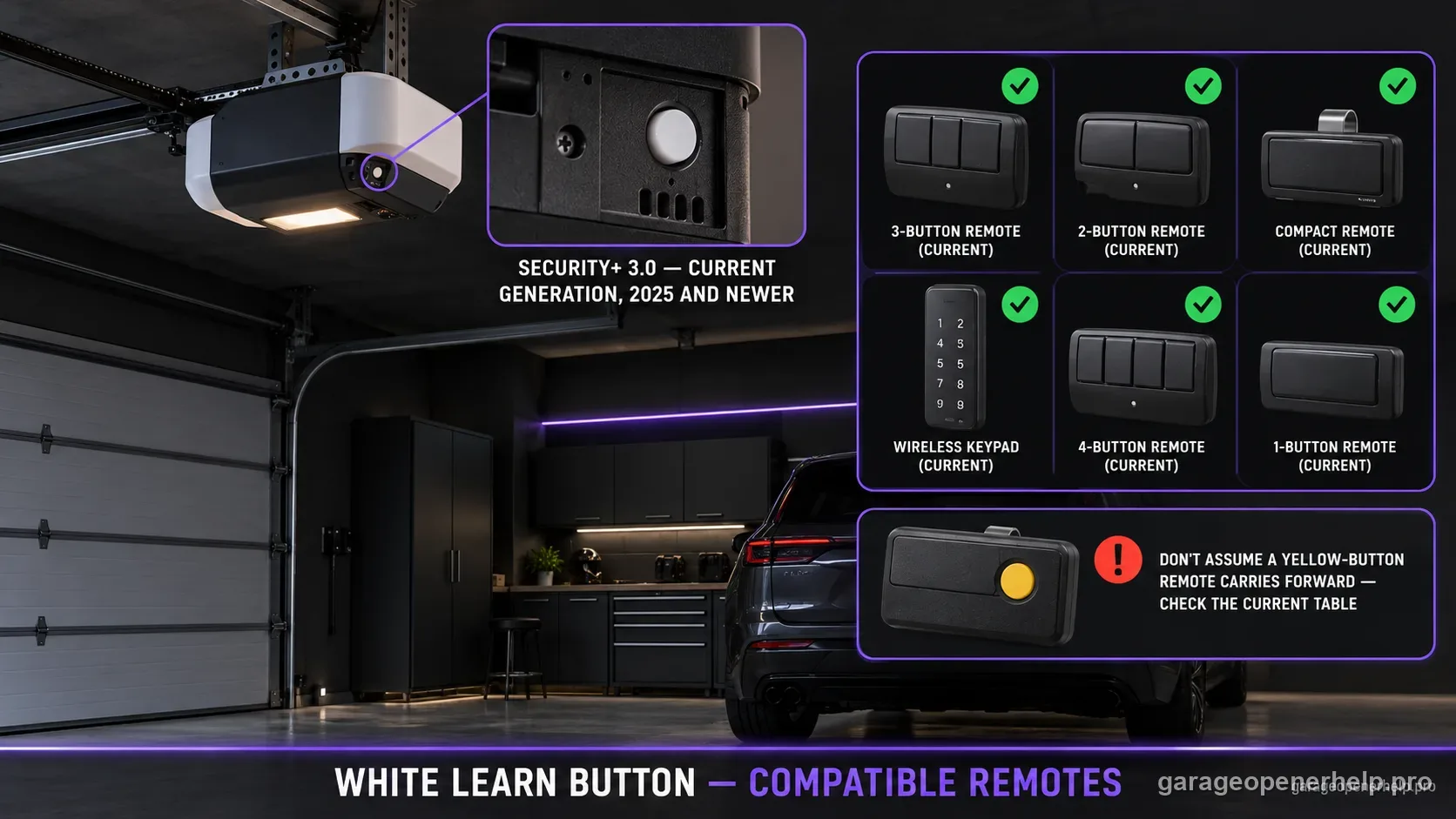
Chamberlain Group identifies the white round LEARN button as the current Security+ 3.0 generation, introduced on 2025-and-newer products in its compatibility guidance. LiftMaster lists L991S and L993S as white-button remotes and also lists several current multi-generation models, while Chamberlain lists its current white-button remote families separately. Verify the exact accessory on the live manufacturer chart before purchase.
Identify the Chamberlain / LiftMaster radio generation
Which LEARN-button family do you actually have?
Use shape as well as color: a round white button is the current Bluetooth Security+ 3.0 branch; an older square white button can be a DIP-switch unit. Round yellow has two manufacturer-listed eras, and blue 433 MHz identifies a discontinued replacement-board exception. Cross-check the antenna, nearby LED and model label.
What you are likely to notice
- Your opener has a white round LEARN button
- An older yellow/purple/red/green compatibility chart does not mention your opener
- You are replacing a remote on a 2025-or-newer Chamberlain Group opener
Check these in order
1. Confirm the button is truly white
Chamberlain Group's current identification page separates the white round button from the earlier yellow round Security+ 2.0 generations. Do not choose an accessory merely because both buttons are round.
2. Treat white as a new compatibility branch
The manufacturer identifies white-button openers with Security+ 3.0. That is why legacy advice built around green, red/orange, purple, and yellow should not be copied forward without checking the current compatibility chart.
3. Use the brand-specific current compatibility page
LiftMaster's current chart lists L991S and L993S specifically for white-button openers and also shows several current broader-coverage remotes. Chamberlain's compatibility page has its own current white-button product family. Use the page for the brand on the powerhead.
4. Re-check the live manufacturer chart before buying
The white-button Security+ 3.0 accessory lineup is current and can change. Use the manufacturer's live compatibility page rather than an old marketplace listing or cached chart. If the exact accessory relationship is absent, treat it as unverified rather than guessing.
White is not just a newer-looking yellow button
Chamberlain Group's current identification table explicitly gives the white round LEARN button its own Security+ 3.0 technology row. That matters because many older forum posts and product listings stop at the yellow Security+ 2.0 generation and therefore cannot safely answer a current white-button compatibility question.
If an opener was installed in 2025 or later, visual confirmation of a white button should immediately move the search to the current compatibility table. Do not use an archived legacy chart as the purchasing decision.
Current LiftMaster and Chamberlain accessory families are brand-specific
LiftMaster's current compatibility page lists L991S and L993S for white-button openers and also shows broader current remote models that include white among their supported colors. Chamberlain's compatibility page separately lists its current CH-series remotes for white-button products. Use the brand printed on the opener when choosing the current accessory family rather than relying only on the shared parent company.
Brand should be identified before Learn-button color when possible. A shared radio generation does not mean every LiftMaster and Chamberlain accessory name is interchangeable.
Treat current-generation compatibility as live data
Because the white-button ecosystem is current, product names and supported accessories can change faster than legacy compatibility tables. Every white-button result should keep a source URL and a last-reviewed date so it can be revalidated during future QA batches.
If a user enters a newly released remote that is not yet in the local dataset, the correct tool behavior is 'not yet verified' with a manufacturer link—not a best guess based on similar model numbering.
Use the installed radio generation, not assumptions about the house or opener age
A recently purchased home can contain a much older opener, while an older opener can contain a replacement board or external receiver. Neither the house age nor the garage door's age determines remote compatibility. The radio hardware and current manufacturer chart do.
For white-button systems, photograph the model label and button before ordering. If the powerhead has been serviced and the observed radio hardware does not match the original manual, use the current installed hardware as the starting point and confirm the relationship through Chamberlain Group support.
Stop DIY troubleshooting when…
- The opener is not a Chamberlain Group product
- The white button is on a replacement receiver rather than the original powerhead
- The exact remote model is not listed on the current compatibility chart
Garage door springs, cables and a falling/unbalanced door can store or release dangerous force. Those are door-system problems, not just opener settings.
Common questions
What technology does a white LEARN button use?
Chamberlain Group's current identification page maps the white round LEARN button to Security+ 3.0.
Which LiftMaster remotes are listed for white-button openers?
The current LiftMaster compatibility page lists L991S and L993S for openers manufactured after 2024 and also lists current multi-generation remotes such as L993M, L932M and L992U with white-button compatibility.
Can I assume an old yellow-button remote will work on a white-button opener?
No. Use the current manufacturer compatibility chart for the exact remote. White and yellow are separate radio-generation rows in Chamberlain Group's support data.
Manufacturer sources used
These links are the factual baseline for the diagnostic claims above. Model-specific manuals can supersede general guidance.