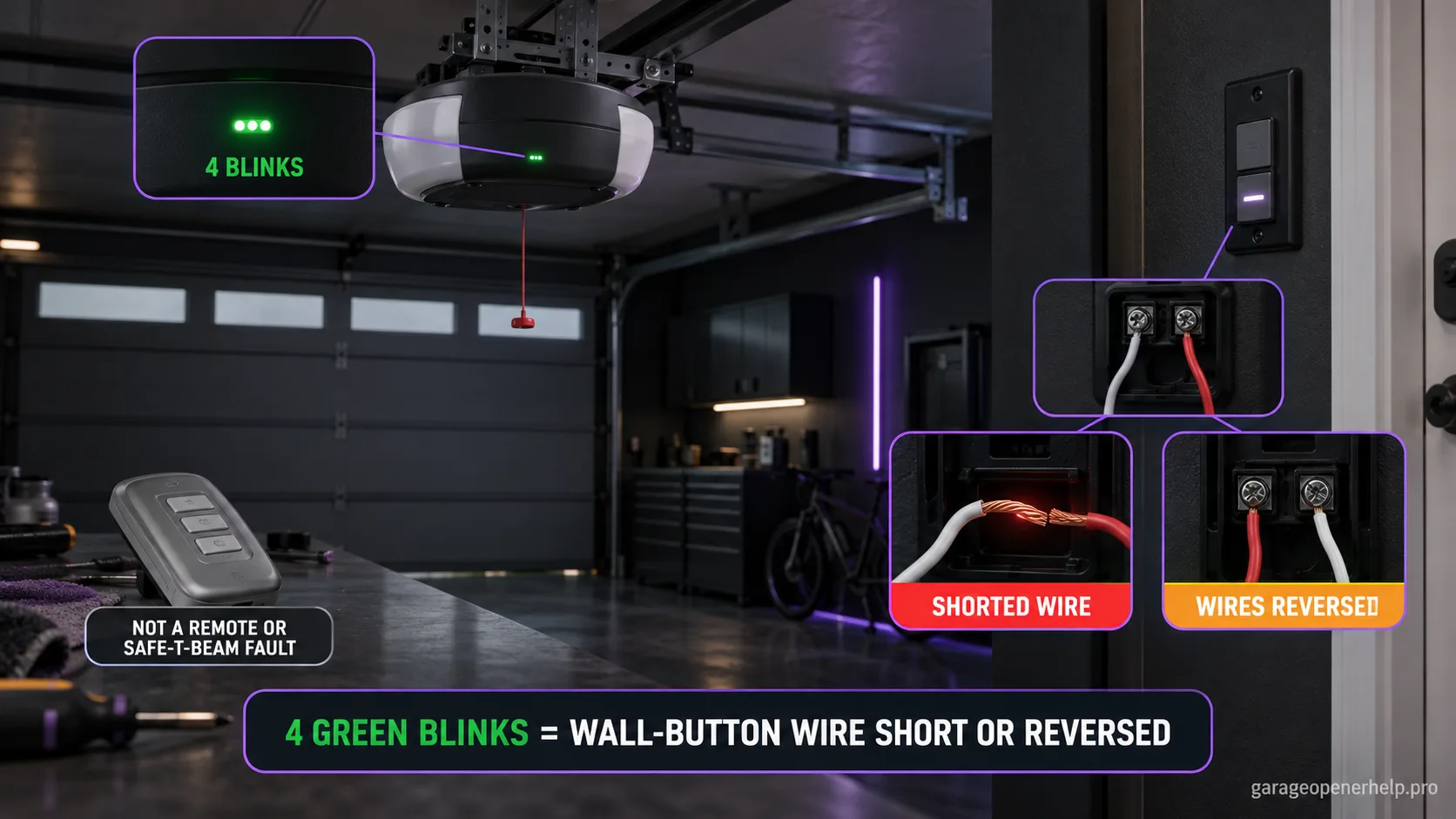
On Genie models 1022, 1024, 1042, 2022, 2024, 2042 and 2027, four GREEN powerhead LED blinks followed by a pause mean the wall-button wire is shorted or the wall-button wires are reversed. Genie directs owners to inspect the wall control and low-voltage wiring, repair shorts, and correct terminal orientation according to the exact manual.
Diagnostic snapshot
- Answer
- Four GREEN powerhead blinks on the covered Genie family mean the wall-button wire is shorted or the wall-button wires are reversed.
- Check first
- Compare wall-control and remote operation, then inspect accessible low-voltage wall-control cable and terminal orientation.
- Strong clue
- A known remote that still works while the wired wall panel fails makes the wall-control circuit much more consistent than a radio receiver fault.
- Model / generation note
- This interpretation applies to the documented 1022/1024/1042/2022/2024/2042/2027 powerhead indicator.
Do not mix Genie powerhead LED states with Safe-T-Beam LED states
Which LED is blinking: the opener powerhead or the floor-level Safe-T-Beam?
Genie documents powerhead LED diagnostics separately from the red/green Safe-T-Beam pair. Record LED color, solid/blinking state and blink count at the powerhead before choosing a branch.
This exact manufacturer signal can feed the following diagnostic family. Keep the original code or LED pattern when troubleshooting.
What you are likely to notice
- The green powerhead diagnostic LED blinks four times and repeats
- The wired wall control may be dead or behave abnormally
- A remote may still work, depending on the exact fault
- The wall-control wire may have been stapled, pinched, replaced, or reconnected recently
Check these in order
1. Compare wired and wireless controls
If a known remote works while the wired wall panel does not, the evidence strongly supports the wall-control circuit. If neither control path works, confirm opener power and record other diagnostic indicators before narrowing to the wall wiring.
2. Inspect accessible low-voltage wall-control wire
Genie specifically warns that staples can cut insulation and short the conductors. Look for crushed cable, exposed copper, loose terminal screws, or a recent splice. Do not confuse the low-voltage wall-control cable with household mains wiring.
3. Verify terminal orientation from the exact manual
The diagnostic chart includes reversed wall-button wiring as a four-blink cause. Use the opener's wiring diagram to confirm conductors are landed on the specified terminals. Do not swap wires repeatedly by trial and error without documenting the original state.
4. Isolate a damaged wall control from damaged in-wall cable
If visible connections are correct but the pattern remains, the fault can be in the wall panel or a hidden section of cable. At that point, use the model-specific service test or a qualified technician rather than opening unrelated sensor or receiver circuits.
Why a working remote is useful evidence
When a wireless remote still operates the opener but the wired wall control does not, the radio receiver and major opener functions are less likely to be the immediate cause. That observation fits Genie's four-green-blink wall-button circuit diagnosis.
If every control path is dead, do not force the result into a wall-wire explanation. Confirm power and other diagnostics first.
Staples and terminal polarity are not trivial details
Genie explicitly calls out staples cutting insulation and shorting low-voltage wall-control wire. The fault can be visually subtle, especially where cable is tightly stapled to framing or enters the wall.
The chart also lists reversed wires. Photograph the current terminal layout and compare it with the exact opener manual before changing connections so the original state is not lost.
Where homeowner checks should stop
Accessible low-voltage connections can be inspected for obvious damage, but hidden cable faults and internal control-board diagnosis are different jobs. Do not open powered electrical sections or confuse wall-control conductors with mains wiring.
If verified terminal orientation and visible cable condition do not clear the pattern, preserve the four-blink evidence for model-specific service.
Use the four-blink code to avoid replacing unrelated parts
Because the manufacturer points directly to the wall-button circuit, a four-green-blink pattern is evidence against starting with Safe-T-Beam replacement, remote batteries, or travel-limit changes. Those systems may have their own problems, but they do not explain the documented code by themselves.
A technician or support agent will get more value from a photo of the terminal layout, the exact opener model, and whether a remote still works than from a list of unrelated parts already replaced. Preserve that evidence before the wiring is changed further.
If the problem began immediately after drywall work, storage changes, or re-mounting the wall console, include that timing in the handoff. Low-voltage cable can be pinched or stapled without an obvious open break, so the history of what changed around the wire route can be diagnostically useful.
Stop DIY troubleshooting when…
- The cable disappears into a damaged wall cavity
- There is burning, water damage, or mains-voltage uncertainty
- The wall control/cable must be electrically isolated beyond accessible low-voltage checks
- The four-blink pattern returns after verified wiring correction
Garage door springs, cables and a falling/unbalanced door can store or release dangerous force. Those are door-system problems, not just opener settings.
Common questions
What do four green blinks mean on this Genie family?
Genie lists a shorted wall-button wire or reversed wall-button wires.
Can the remote still work with this problem?
It can, because the wired wall-control path is separate from the handheld remote radio path. Compare both controls as a diagnostic clue.
Should I replace the wall console first?
Not before checking accessible wiring and terminal orientation. The chart includes both wiring and wall-control possibilities, so replacing parts without isolating the circuit can be wasteful.
Manufacturer sources used
These links are the factual baseline for the diagnostic claims above. Model-specific manuals can supersede general guidance.