For Genie models 1022, 1024, 1042, 2022, 2024, 2042 and 2027, five GREEN powerhead LED blinks followed by a pause mean either the chain/belt is too tight or there is a control-system failure. Genie directs owners to check chain/belt tension using the owner's manual and to contact Genie for service if the mechanical branch does not explain the code. Do not blindly loosen the drive or replace the control board from the blink count alone.
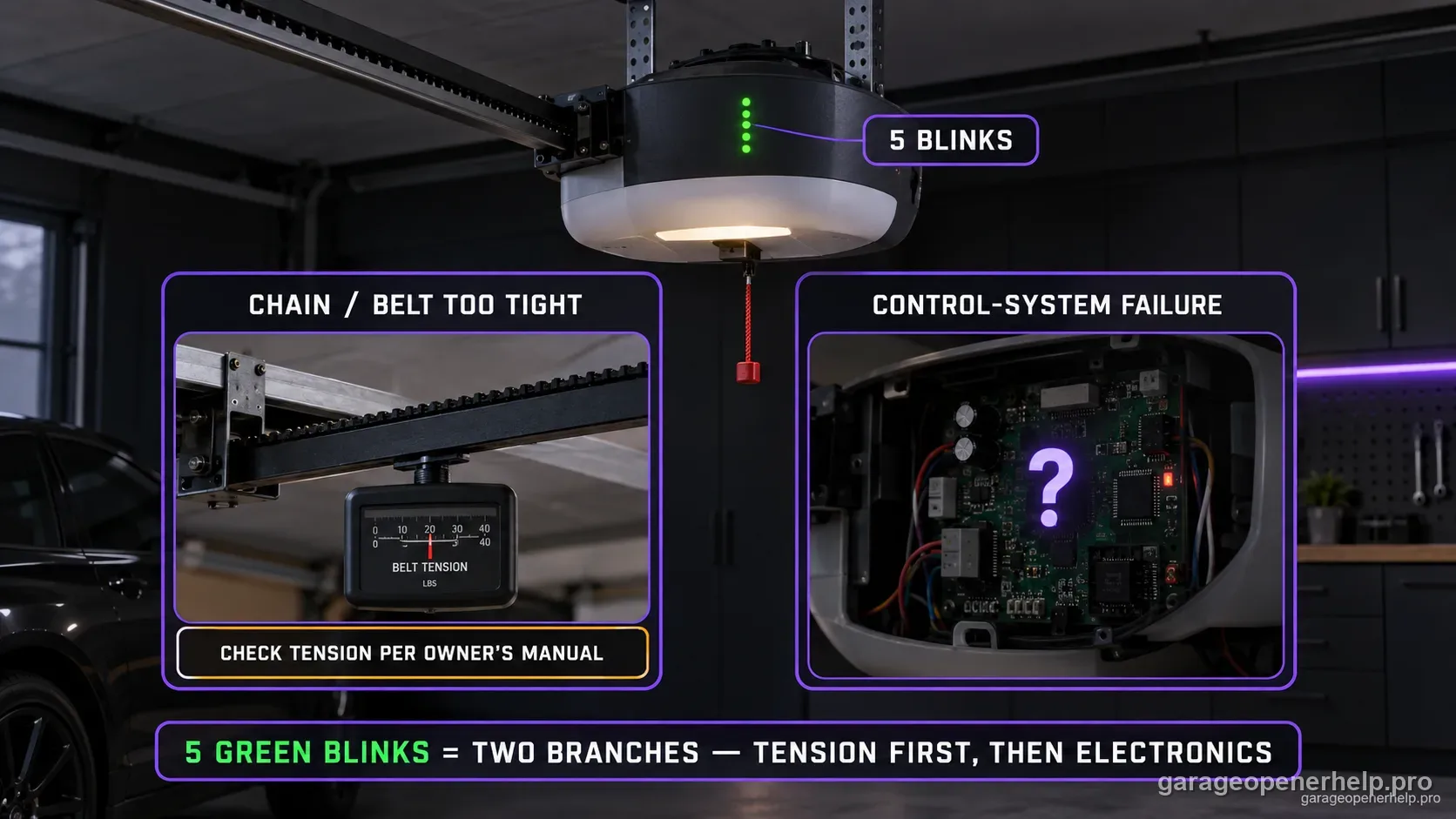
Diagnostic snapshot
- Answer
- Five GREEN powerhead blinks on the covered Genie family mean either the chain/belt is too tight or there is a control-system failure.
- Check first
- Verify exact model and drive-tension specification, and separate rail-drive tension from a heavy or binding garage door.
- Strong clue
- If drive tension and door movement are normal but the same five-blink pattern persists, the manufacturer's control-system branch becomes more consistent.
- Model / generation note
- Other Genie families—including Excelerator—use different blink-code definitions, so model scope is essential.
Do not mix Genie powerhead LED states with Safe-T-Beam LED states
Which LED is blinking: the opener powerhead or the floor-level Safe-T-Beam?
Genie documents powerhead LED diagnostics separately from the red/green Safe-T-Beam pair. Record LED color, solid/blinking state and blink count at the powerhead before choosing a branch.
This exact manufacturer signal can feed the following diagnostic families. Keep the original code or LED pattern when troubleshooting.
What you are likely to notice
- The green powerhead indicator blinks five times and repeats
- The opener belongs to the documented Genie model family
- The opener may sound strained, stop, or behave abnormally
- The drive chain/belt may have been adjusted or service work may have occurred before the code
Check these in order
1. Confirm the five-green-blink pattern and model family
Five blinks has different meanings on other Genie product families—for example, Excelerator uses its own status-light chart. Count the powerhead indicator on the exact listed model before using this diagnosis.
2. Look for evidence of excessive drive tension without guessing
Genie's chart lists a chain or belt that is too tight as one branch. Check the exact owner's manual for the correct tension specification and visual setup. Do not loosen a belt or chain by an arbitrary amount; an incorrectly tensioned drive can create new problems.
3. Separate drive tension from door resistance
A heavy, binding, or unbalanced garage door can make an opener sound strained even when the rail drive is adjusted correctly. If the door is fully closed and stable, use only the manual's safe release procedure to assess obvious binding; never adjust springs or lift cables yourself.
4. Escalate the control-system branch when mechanical checks do not fit
The same Genie five-blink definition includes control-system failure. If the drive tension and door condition are not abnormal, do not keep making mechanical adjustments. Preserve the blink pattern and exact model and move to Genie support or qualified service for internal controls.
Five green blinks contain two different branches
Genie's chart does not define five green blinks as one failed part. It lists either a chain/belt that is too tight or a control-system failure. That means the diagnostic job is to distinguish a visible/mechanical drive-tension issue from an internal controls issue.
Do not collapse the code into a one-part verdict such as 'bad board' or 'tight belt.' The manufacturer definition keeps both branches open until the drive tension and door condition are checked.
Drive tension and door resistance are different
A chain or belt can be improperly tensioned even when the garage door itself is healthy. Conversely, a heavy or binding door can strain a correctly adjusted opener. Check the exact rail-drive specification and the door's safe manual movement as separate observations.
Do not compensate for a heavy door by loosening the drive or increasing force. Spring/cable repair belongs to trained door-system service.
When the control-system branch becomes stronger
If the drive tension matches the exact manual, the door moves safely, and five green blinks persist, the mechanical explanation becomes less consistent. At that point Genie itself directs owners toward service for the control-system branch.
Preserve the exact model and blink count before service. Other Genie families use different status-light codes, so the model scope is part of the diagnostic evidence.
Do not mix this five-blink code with Excelerator five blinks
Genie's Excelerator family uses a separate self-diagnostic status-light chart where five blinks points to a Safe-T-Beam malfunction. That is not the meaning used by the 1022/1024/1042/2022/2024/2042/2027 powerhead chart. The opener family must be identified before interpreting the count.
The number of blinks by itself is not enough when the same brand uses multiple diagnostic systems across product generations. Record both the opener family and the physical indicator location before applying a blink chart.
Stop DIY troubleshooting when…
- The garage door is heavy, unbalanced, off-track, or has spring/cable damage
- Drive-tension adjustment cannot be verified from the exact manual
- The opener shows electrical damage, odor, or repeated control failure
- Five blinks persist after the documented mechanical branch is ruled out
Garage door springs, cables and a falling/unbalanced door can store or release dangerous force. Those are door-system problems, not just opener settings.
Common questions
Do five green blinks prove the chain or belt is too tight?
No. Genie lists two branches: excessive chain/belt tension or a control-system failure.
Can I loosen the belt until the code clears?
No. Use the exact model's specified drive-tension procedure; arbitrary adjustment can create a new drive problem.
What if the door and drive tension both look normal?
That makes the control-system branch more important. Preserve the five-blink signal and use Genie/model-specific service rather than continuing mechanical adjustments.
Manufacturer sources used
These links are the factual baseline for the diagnostic claims above. Model-specific manuals can supersede general guidance.