Chamberlain Group says Smart Garage Control will not operate dip-switch openers, although monitor mode can report door status. It also will not directly operate Chamberlain-family 433 MHz units with a blue Learn button; those need a documented myQ control-panel path. The same official compatibility table lists Craftsman AssureLink as not compatible.
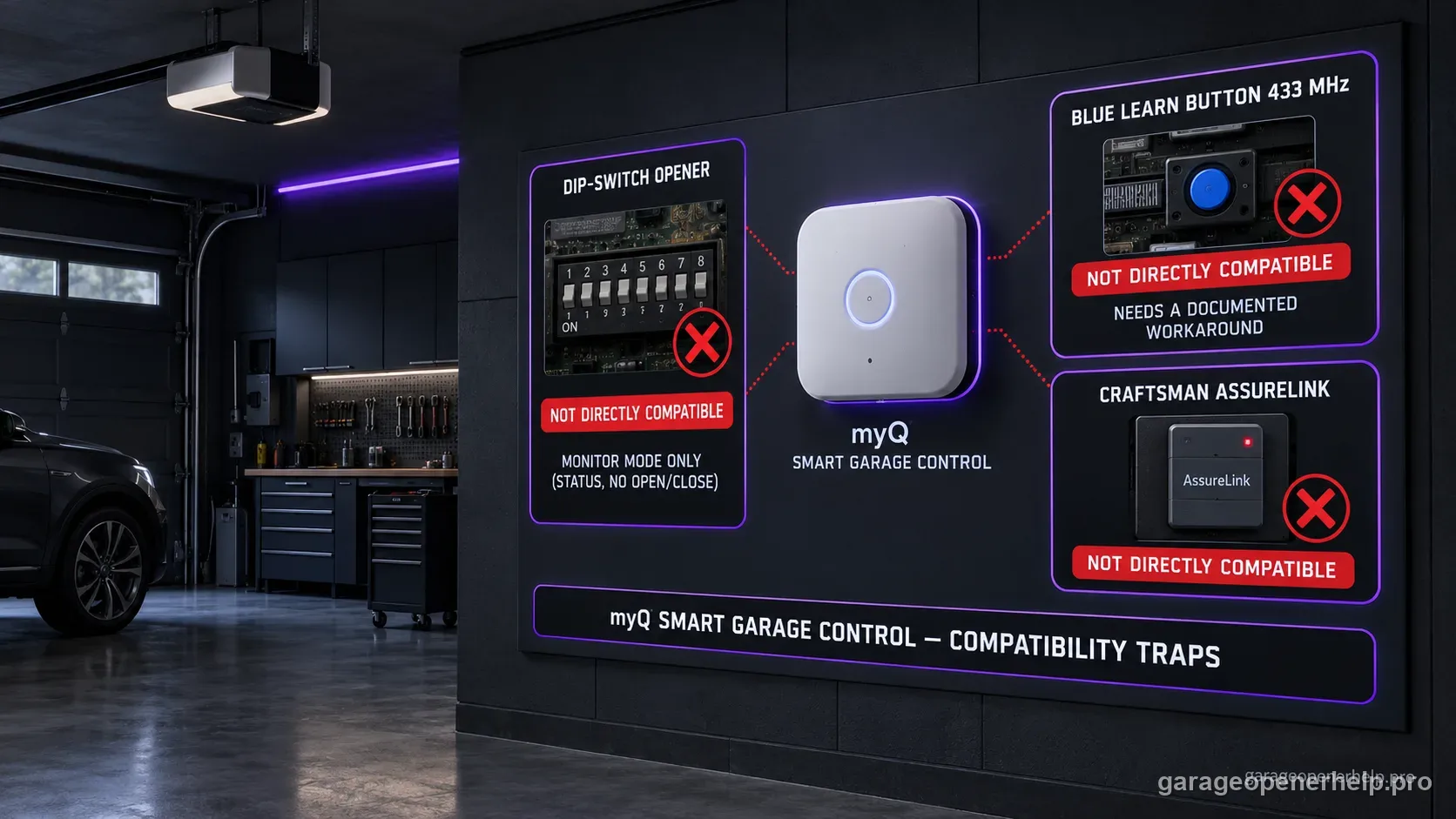
Diagnostic snapshot
- Answer
- Smart Garage Control does not operate dip-switch openers; blue 433 MHz Chamberlain-family units are not directly supported; and the official table lists AssureLink as not compatible.
- Check first
- Identify which exception you actually have before buying a hub, control panel or replacement opener.
- Strong clue
- Physical dip switches, a verified blue 433 MHz Learn-button generation, or a named AssureLink platform each route to a different non-standard result.
- Model / generation note
- Dip-switch monitor mode reports door state but is not full open/close control.
What you are likely to notice
- The myQ app enters monitor mode instead of controlling the door
- The opener uses physical dip switches
- A LiftMaster/Chamberlain/Craftsman opener has a blue Learn button / 433 MHz platform
- The opener is a Craftsman AssureLink model
Check these in order
1. Dip switches mean monitor-only for Smart Garage Control
The official compatibility page says the Smart Garage Control will not operate a dip-switch opener. It can be configured to monitor door status, but monitor-only must not be described as full remote open/close compatibility.
2. Blue Learn button / 433 MHz needs a different path
Chamberlain Group explicitly excludes Chamberlain-family blue-Learn-button 433 MHz units from direct Smart Garage Control operation. Their documented solution uses a compatible myQ control panel paired with the myQ hub/control ecosystem. Verify the exact opener before buying that panel.
3. AssureLink is named as not compatible
The Smart Garage Control compatibility table lists Craftsman AssureLink as Not compatible. That named exception is more reliable than a generic statement that most Craftsman openers work.
4. Do not convert an exception into a parts recommendation
A compatibility exception tells you that the standard path does not apply; it does not prove which replacement opener, control panel or smart platform is best for the home. Preserve the exact model and use manufacturer documentation for any hardware change.
Monitor mode is not remote-control compatibility
For dip-switch openers, Chamberlain Group makes an important distinction: Smart Garage Control can monitor door status but will not operate the opener. A homeowner expecting remote open/close control would reasonably consider monitor-only a failed purchase if it were labeled simply 'compatible.'
Treat monitor-only as a separate result state, not as a weaker shade of full remote-control compatibility.
Named exceptions beat broad brand rules
Most Chamberlain-made post-1993 openers are broadly supported, but blue 433 MHz units require a different documented myQ control-panel path, and AssureLink appears in the official name table as Not compatible. These exceptions demonstrate why 'Craftsman usually works' or 'Chamberlain after 1993 works' is not enough for a purchasing decision.
When an exception requires an accessory such as a myQ control panel, verify the exact opener's control-panel compatibility before ordering. The exclusion itself does not identify the correct replacement hardware.
Why a control-panel workaround needs exact-model verification
The blue 433 MHz exception is a good example of why compatibility work cannot stop at a general rule. Chamberlain Group describes a myQ control-panel path, but a homeowner still needs to know whether the exact opener accepts the specified panel and what additional gateway/hub relationship applies. A named workaround is not permission to attach any myQ wall control to any blue-button opener.
The exclusion can be stated confidently, but keep any hardware recommendation conditional until the exact opener model is known.
What to do when the result is monitor-only
If a dip-switch opener can only be monitored, decide whether status-only is actually useful before purchasing. The app may tell you whether the door is open or closed, but the accessory will not provide the remote activation behavior many users expect from myQ.
If full remote operation is the requirement, move from compatibility lookup into an upgrade decision rather than repeatedly reprogramming a system the manufacturer says cannot be operated by Smart Garage Control.
Before replacing the entire opener, document the exact model, door configuration, existing safety sensors and desired features. The compatibility result should narrow the options, not force a purchase that ignores the condition of the garage door system or the possibility of a verified control-panel path.
This is also the point where model-level documentation matters more than marketplace listings. A third-party product page may say a hub is universal, while Chamberlain Group publishes explicit exclusions and monitor-only cases. Use the manufacturer rule as the purchase boundary.
Stop DIY troubleshooting when…
- The exact platform cannot be identified
- A blue-button opener's control-panel compatibility has not been verified
- The user expects monitor-only mode to operate the door
- The opener has unsafe door or sensor behavior
Garage door springs, cables and a falling/unbalanced door can store or release dangerous force. Those are door-system problems, not just opener settings.
Common questions
Can Smart Garage Control operate a dip-switch opener?
No. Chamberlain Group says it can monitor a dip-switch opener's door status but cannot activate the opener.
What about a blue Learn button?
Chamberlain-family 433 MHz blue-Learn-button units are not directly operated by Smart Garage Control; Chamberlain documents a myQ control-panel path that must be verified for the exact opener.
Is Craftsman AssureLink compatible with Smart Garage Control?
The current Chamberlain Group compatibility table lists AssureLink as Not compatible.
Manufacturer sources used
These links are the factual baseline for the diagnostic claims above. Model-specific manuals can supersede general guidance.