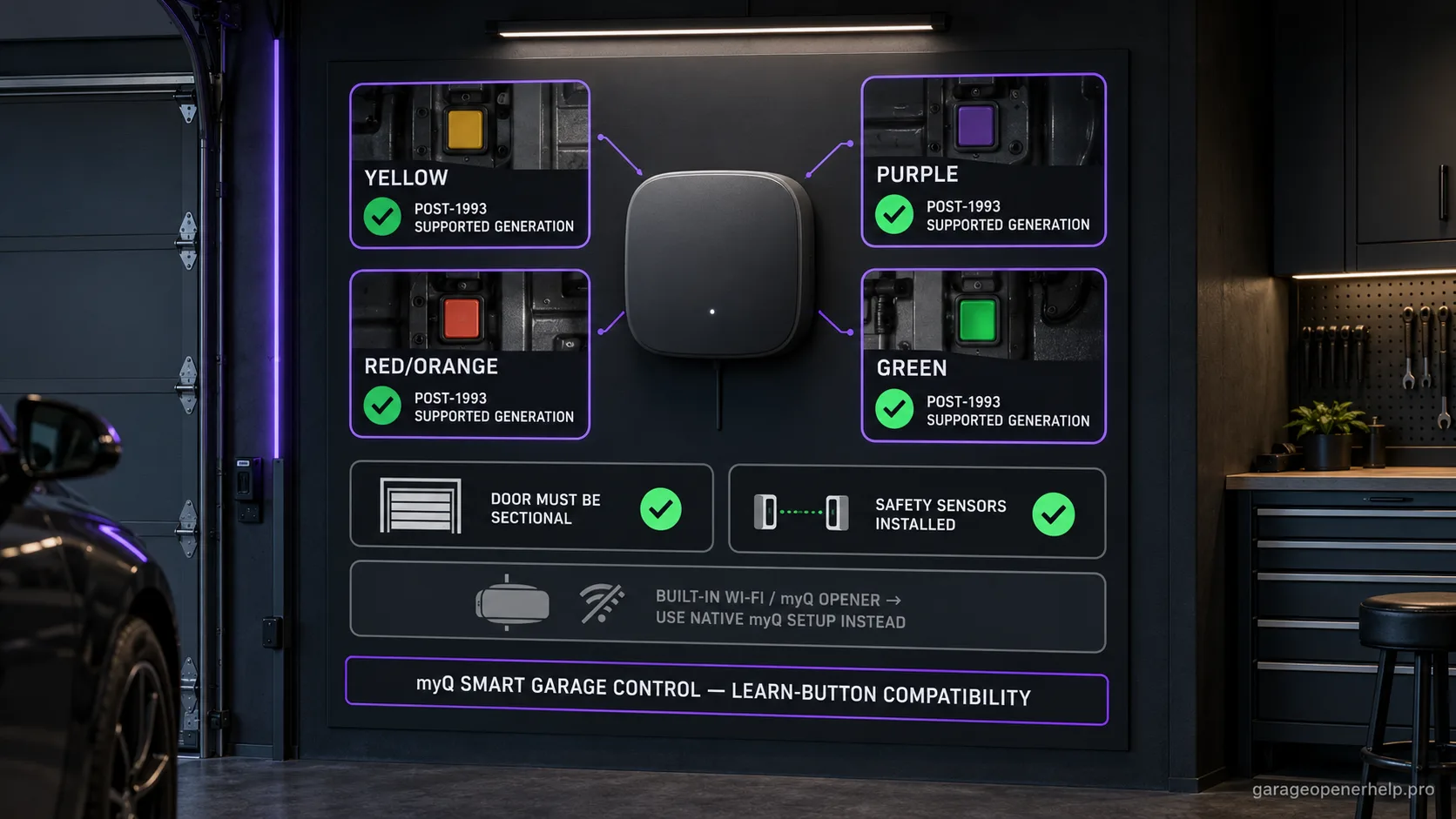
Chamberlain Group lists supported yellow, purple, red/orange and green Learn-button generations for Smart Garage Control, but the color alone is not a purchase decision. In the United States, the Smart Garage Control manual excludes Chamberlain Group openers with a yellow Learn button made from 2010 through 2021 and systems whose photo-eye sensors change power mode. Confirm the exact model and product-specific compatibility result; the door must also be sectional with working safety sensors.
Diagnostic snapshot
- Answer
- Chamberlain Group lists supported post-1993 LiftMaster/Chamberlain/Craftsman yellow, purple, red/orange and green Learn-button generations as compatible with Smart Garage Control, subject to door/sensor requirements.
- Check first
- Confirm the motor-unit Learn button, approximate year, sectional door and working safety sensors.
- Strong clue
- A post-1993 Chamberlain-family opener with one of the listed Learn-button generations and no built-in Wi-Fi fits the external Smart Garage Control path.
- Model / generation note
- Built-in-Wi-Fi/myQ openers use a different native setup path; blue 433 MHz and dip-switch systems are exceptions.
What you are likely to notice
- You want to add myQ control to an older non-Wi-Fi Chamberlain-family opener
- The opener has a yellow, purple, red/orange or green Learn button
- You are unsure whether a Smart Garage Control is appropriate instead of an Internet Gateway or built-in Wi-Fi setup
Check these in order
1. Confirm the opener is a compatible post-1993 generation
Chamberlain Group says Smart Garage Control is designed for openers manufactured after 1993 with a program or Learn button. For LiftMaster/Chamberlain/Craftsman, the official page shows supported yellow, purple, red/orange and green Learn-button families, subject to the product-specific exclusions below.
2. Confirm the door-system requirements
The official compatibility page requires a sectional garage door and installed safety sensors. Do not reduce compatibility to radio protocol alone; the accessory is designed around a safely equipped sectional-door system.
3. Separate external Smart Garage Control from built-in myQ
If the motor unit already has built-in Wi-Fi/myQ, Chamberlain Group directs owners to the Wi-Fi garage-door-opener setup path. Adding an external hub is not the default setup for a native myQ opener.
4. Treat exceptions as exceptions
Blue 433 MHz units, dip-switch systems and some named platforms are handled differently. If the Learn-button color or platform falls outside the supported set, stop and use the exception guide rather than guessing from the Chamberlain brand name.
5. Check the yellow-button date and sensor power behavior for Smart Garage Control
In the United States, the Smart Garage Control owner’s manual says it is not intended for Chamberlain Group openers with a yellow Learn button manufactured from 2010 through 2021, or for openers whose photo-eye sensor lights shut off after the door closes. If the model/date or sensor behavior is unclear, use the exact-opener compatibility result or contact myQ support before buying. This exclusion is product-specific; do not transfer it to a different myQ hub or accessory.
Compatibility is more than radio generation
The Chamberlain Group table gives a strong radio-generation rule for post-1993 Chamberlain-family openers, but the same page also requires a sectional door and installed safety sensors. Those system requirements matter because Smart Garage Control is not simply a universal RF transmitter; it is designed to monitor and control a safely configured sectional garage door.
This is also why an opener can be radio-compatible yet still be the wrong candidate for setup until a failed sensor system is repaired. Compatibility should not be used to route around a safety fault.
Built-in myQ changes the setup path
Chamberlain Group separates Wi-Fi garage door openers from external Smart Garage Control setup. If the exact opener already includes built-in Wi-Fi/myQ, troubleshoot its native connectivity instead of adding another hub because the app is offline.
The practical distinction is 'non-connected compatible opener that needs a hub' versus 'myQ-enabled opener that needs Wi-Fi/account troubleshooting.' Those are different support paths even though both end in the same myQ app.
Why the 1993 date should be treated as a floor, not a guarantee
Chamberlain Group describes Smart Garage Control as designed for openers manufactured after 1993 that have a Learn/program button, but it also publishes explicit exceptions. The date is therefore a useful eligibility filter, not a reason to ignore radio generation, named platform, door type, safety-sensor requirements, or a blue-button 433 MHz exception.
If the opener is near the cutoff year, use the motor-unit label and Learn button rather than estimating age from the garage or the remote shell.
What a good compatibility result should tell you before purchase
A useful result should identify the compatible path, the evidence used, and the conditions that could still invalidate the recommendation. For this family that means manufacturer, post-1993 generation, supported Learn-button color, sectional-door configuration, working safety sensors, and whether the opener already has built-in myQ.
If any one of those high-value clues is unknown, resolve it before buying. A brand-level 'usually works' rule is not a substitute for the documented model, Learn-button, door-type and safety-sensor requirements.
After installation, a pairing failure should be diagnosed as a setup problem only after compatibility is confirmed. Weak garage Wi-Fi, an unpaired door sensor, account/app state, or an opener that never completed the learn sequence can each make a compatible system appear unsupported.
The yellow-button exception is limited to this specific myQ product
The Smart Garage Control owner’s manual adds an important U.S. exclusion to the broad Learn-button color list: Chamberlain Group openers with a yellow Learn button manufactured from 2010 through 2021 are not intended for this product. The same manual excludes systems whose photo-eye lights change power mode and turn off after the door closes.
This does not turn every yellow Learn button into an unsupported result for every myQ accessory. Keep product names separate: check the exact model against the current compatibility tool, and do not borrow Smart Garage Hub or another accessory's color chart as a Smart Garage Control approval.
Confirm the model when color and manufacture year are not enough
Yellow identifies a receiver generation but not a precise manufacturing year. Read the opener label and use the exact model in the compatibility checker; if the label is missing or the date cannot be established, ask myQ support before purchasing. A sectional door and working photoelectric sensors remain separate requirements even when the radio generation is supported.
Stop DIY troubleshooting when…
- The opener uses dip switches
- The opener has a blue 433 MHz Learn button
- A U.S. Chamberlain Group yellow-button opener was manufactured from 2010 through 2021
- The photo-eye sensor lights turn off after the door closes
- The door is not sectional or required safety sensors are absent
- The opener already has built-in myQ and the issue is Wi-Fi setup
Garage door springs, cables and a falling/unbalanced door can store or release dangerous force. Those are door-system problems, not just opener settings.
Common questions
Which Learn-button colors does Smart Garage Control support on Chamberlain-family openers?
The current Chamberlain Group compatibility page shows yellow, purple, orange/red and green for compatible post-1993 LiftMaster/Chamberlain/Craftsman units.
Does the garage door need safety sensors?
Yes. Chamberlain Group lists installed safety sensors and a sectional garage door as requirements.
Should I add Smart Garage Control to an opener that already has myQ Wi-Fi?
Not as the normal setup path. Chamberlain Group directs built-in-Wi-Fi opener owners to the native Wi-Fi setup/troubleshooting guide.
Manufacturer sources used
These links are the factual baseline for the diagnostic claims above. Model-specific manuals can supersede general guidance.