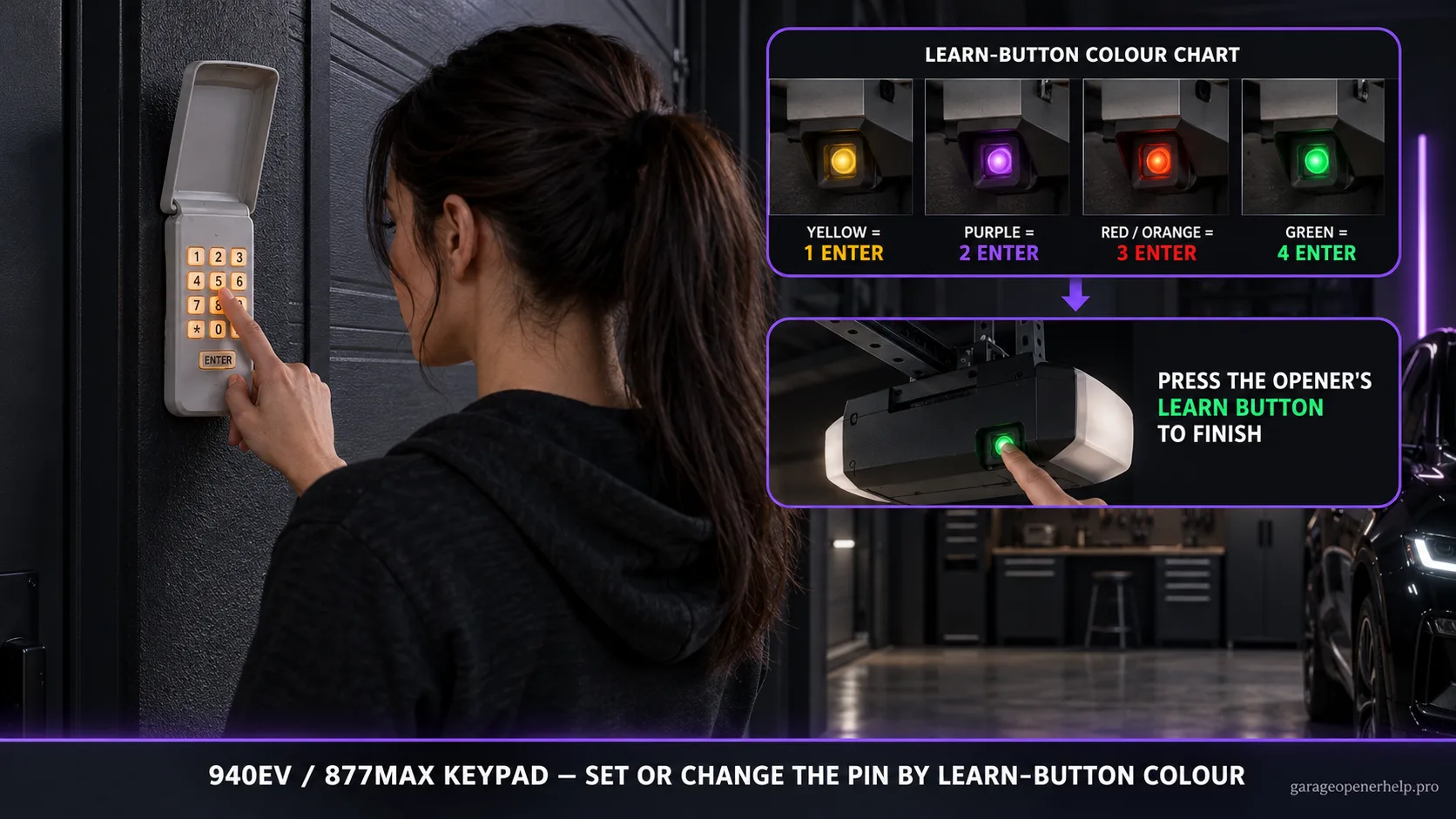
For 940EV/940EVMC and 877MAX/877MAXMC keypads, Chamberlain Group uses the same opener-family mapping: yellow LEARN button = 1 ENTER press, purple = 2, red/orange = 3, green = 4. After the keypad is set to that family, press the opener's LEARN button and enter the chosen PIN within 30 seconds.
Identify the Chamberlain / LiftMaster radio generation
Which LEARN-button family do you actually have?
Use shape as well as color: a round white button is the current Bluetooth Security+ 3.0 branch; an older square white button can be a DIP-switch unit. Round yellow has two manufacturer-listed eras, and blue 433 MHz identifies a discontinued replacement-board exception. Cross-check the antenna, nearby LED and model label.
What you are likely to notice
- You are adding a 940EV/940EVMC or 877MAX/877MAXMC keypad
- The keypad lights but the opener does not respond
- You need to set a new four-digit PIN after replacing or reprogramming the keypad
Check these in order
1. Clear the doorway and identify the opener family
Before programming, keep the door path clear and identify the LEARN button color. The keypad uses the opener generation to decide how many times ENTER is pressed during setup.
2. Start keypad setup and choose a PIN
Chamberlain Group instructs users to hold the * and # keys until the keypad lights stop blinking, enter a four-digit PIN, and press #. Use a PIN you can remember without writing it on the keypad housing.
3. Select the opener type
Press and release ENTER 1 time for yellow Security+ 2.0, 2 times for purple Security+ 315 MHz, 3 times for red/orange Security+ 390 MHz, or 4 times for green Billion Code. Then press 0 to finish the keypad-side family selection.
4. Pair the PIN to the opener
Press and release the opener's LEARN button. Within 30 seconds, enter the four-digit PIN and press ENTER until the opener lights flash or two clicks are heard. Then test the PIN from the keypad.
The keypad has two programming stages
The first stage prepares the keypad and tells it which opener family it will talk to. The second stage teaches the opener the selected PIN. Combining those stages into one rushed sequence makes it hard to tell whether a failure came from the keypad's family selection or from the opener's learn window.
Chamberlain Group's instructions begin by holding * and #, entering a four-digit PIN, selecting the opener family with the ENTER press count, and then pressing 0. Only after that keypad-side setup does the LEARN button on the opener become part of the process.
Use a new PIN without erasing more devices than necessary
If the keypad is already paired and the goal is only to change the PIN, use the manufacturer's change-PIN procedure rather than erasing all opener memory. A full receiver memory clear can also remove handheld remotes, vehicles or other wireless controls that then need to be re-added.
For green-button openers and some external receiver situations, Chamberlain Group specifically points users back to the set-keyless-PIN path. That is another reason to identify the opener generation before applying a generic keypad reset video.
A lit keypad does not prove compatibility
Battery power only proves the keypad electronics can light. If the keypad accepts digits but the opener never acknowledges programming, verify the exact keypad model and opener family before assuming a failed receiver. The 940EV and 877MAX instructions cover a documented group of Chamberlain/LiftMaster technologies, not every keypad ever sold under those names.
A white LEARN button deserves a separate current-compatibility check because the manufacturer now treats that Security+ 3.0 generation separately from the legacy 1/2/3/4 mapping.
Temporary PINs are a separate feature from the main access PIN
Chamberlain Group also documents temporary PIN programming for this keypad family. That workflow starts from an already programmed PIN and lets the owner choose a temporary code with a limited operating period. It should not be confused with the initial 1/2/3/4 opener-family setup.
If the existing permanent PIN does not operate the opener, restore normal keypad pairing first. Creating a temporary PIN on top of an uncertain base pairing adds another variable and makes troubleshooting harder.
Stop DIY troubleshooting when…
- The keypad model is not one of the documented families
- The opener uses a white LEARN button and the exact keypad compatibility is not confirmed
- The opener will not enter learn mode
- The keypad is physically damaged or has signs of water intrusion
Garage door springs, cables and a falling/unbalanced door can store or release dangerous force. Those are door-system problems, not just opener settings.
Common questions
What is the ENTER press count for a 940EV or 877MAX keypad?
The official mapping is 1 press for yellow, 2 for purple, 3 for red/orange, and 4 for green LEARN buttons.
How long do I have after pressing the opener's LEARN button?
Chamberlain Group instructs users to enter the four-digit PIN and press ENTER within 30 seconds.
Can I program a 940EV to a white LEARN button opener using the legacy table?
Do not infer that from the old color table. Verify the exact keypad on the current Chamberlain/LiftMaster compatibility page for the white-button generation.
Manufacturer sources used
These links are the factual baseline for the diagnostic claims above. Model-specific manuals can supersede general guidance.