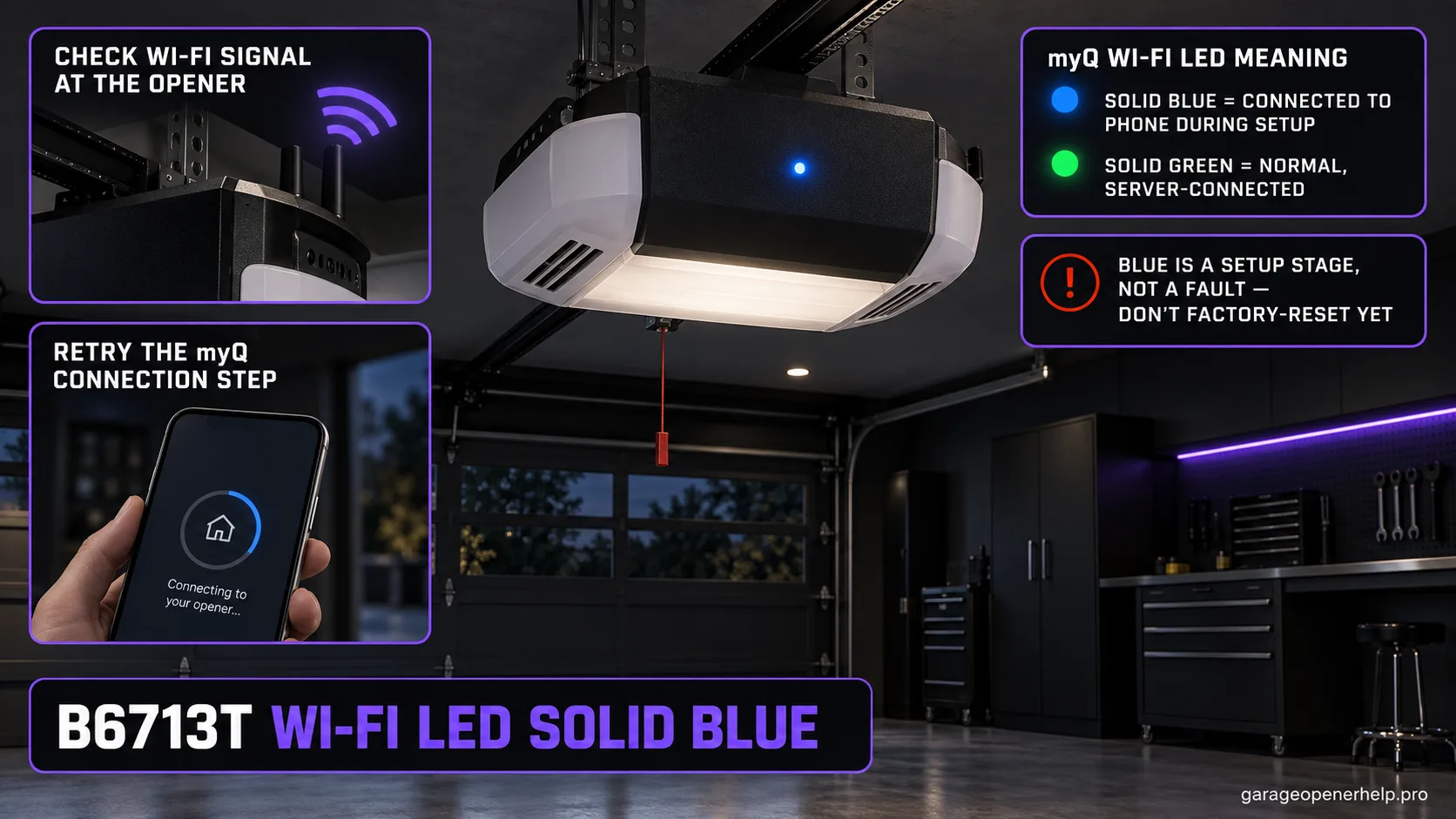
On Chamberlain Group Wi-Fi openers, a solid blue Wi-Fi LED means the opener is connected to the mobile device during setup. The normal server-connected state is solid green. On a B6713T that stays solid blue, check Wi-Fi signal and setup conditions, then retry the myQ connection sequence rather than assuming the door drive or safety sensors are faulty.
Diagnostic snapshot
- Answer
- On a myQ Wi-Fi opener such as the Chamberlain B6713T, a solid blue Wi-Fi LED during setup means the opener is connected to the mobile device but has not yet reached the normal solid-green server-connected state.
- Check first
- Check Wi-Fi signal at the opener, keep the phone near the unit, then retry setup in the myQ app after a controlled power restart if needed.
- Strong clue
- Solid green is the normal connected-to-server state; solid blue is therefore a setup-stage clue rather than proof that internet setup is complete.
- Model / generation note
- The B6713T has built-in Wi-Fi and battery backup. Chamberlain Group's restart guidance says battery-equipped units should have AC and backup battery power disconnected/reconnected in the documented order.
Reconnect the opener to the new Wi-Fi path instead of resetting unrelated settings
Did the router, SSID or Wi-Fi password change while the opener itself still works locally?
A router or credential change is a network-registration problem first. Keep local door operation separate from myQ connectivity, then use the manufacturer reconnect flow for the opener generation.
What you are likely to notice
- The B6713T Wi-Fi LED is solid blue during setup
- The myQ app does not complete internet connection
- The physical door may still operate from the wall control
- The opener has built-in Wi-Fi and battery backup
Check these in order
1. Read solid blue as a Wi-Fi setup state
Chamberlain Group identifies solid blue as connected to a mobile device. A successful normal connection to the server is shown by solid green, so solid blue tells you the setup has not reached its final network state.
2. Check signal where the opener is mounted
Use the phone at the opener location to judge Wi-Fi strength. Weak signal at the ceiling-mounted unit can block the next setup stage even when the phone connects normally elsewhere in the house.
3. Restart the B6713T with its battery backup in mind
For battery-equipped myQ openers, Chamberlain Group's Wi-Fi troubleshooting instructs users to disconnect AC first, disconnect the backup battery, reconnect the battery, then reconnect AC power. This fully restarts both power sources.
4. Retry setup and watch the next LED state
Run setup again in the myQ app while close to the opener. If the LED changes, use the last observed color/pattern to select the next support branch. Solid green is the target state that indicates connection to the server.
Blue does not mean the B6713T is fully online
Chamberlain Group's Wi-Fi LED chart separates the phone/setup connection from the final server connection. Solid blue means connected to a mobile device. Blinking blue/green means the opener is trying to connect to the router, blinking green means it is trying to connect to the server, and solid green is the normal connected-to-server state.
That sequence is useful because it tells you where setup stopped. If the B6713T is solid blue, spending time on safety-sensor alignment or door-force settings will not fix the network stage. Stay in the connectivity branch until the LED reaches the expected network state.
A complete restart on this model includes the backup battery
The B6713T is a battery-backup model. Chamberlain Group's solid-blue troubleshooting specifically distinguishes openers with and without backup batteries: on a battery-equipped unit, disconnect AC first, disconnect the battery, reconnect the battery, then restore AC power.
This matters because unplugging the cord alone does not fully remove power from a battery-backed opener. If you are trying to reset the network state but leave the battery connected, the logic may never experience the full restart you intended. Follow the official sequence and avoid opening electrical compartments beyond the documented battery access procedure.
Stop DIY troubleshooting when…
- The opener shows no Wi-Fi LED after verified power
- The opener produces a separate myQ diagnostic/error code
- There is visible electrical damage
- Network security/settings are controlled by someone else and cannot be verified
Garage door springs, cables and a falling/unbalanced door can store or release dangerous force. Those are door-system problems, not just opener settings.
Common questions
What does a solid blue Wi-Fi LED mean on a Chamberlain B6713T?
Chamberlain Group says solid blue means the Wi-Fi opener is connected to a mobile device. The normal fully connected server state is solid green.
Should I reset travel or safety sensors when the B6713T Wi-Fi LED is solid blue?
No, not for the Wi-Fi symptom alone. A solid blue Wi-Fi LED is a connectivity/setup clue; travel and safety-sensor adjustments belong to separate door-movement symptoms.
Why do I need to disconnect the B6713T battery when restarting Wi-Fi setup?
Because the B6713T has battery backup. Chamberlain Group's Wi-Fi troubleshooting instructs battery-equipped opener owners to disconnect both AC and backup battery power for a complete restart.
Manufacturer sources used
These links are the factual baseline for the diagnostic claims above. Model-specific manuals can supersede general guidance.