On affected Chamberlain, LiftMaster and Craftsman openers, ten flashes of the opener light commonly indicate a safety-reversing sensor problem. Check obstruction, alignment and the low-voltage sensor wiring first, and read both sensor LEDs together (steady amber sender, steady green receiver is normal). Some units manufactured after February 2022 no longer use this same ten-flash behavior, so confirm the opener's build date if the count does not match.
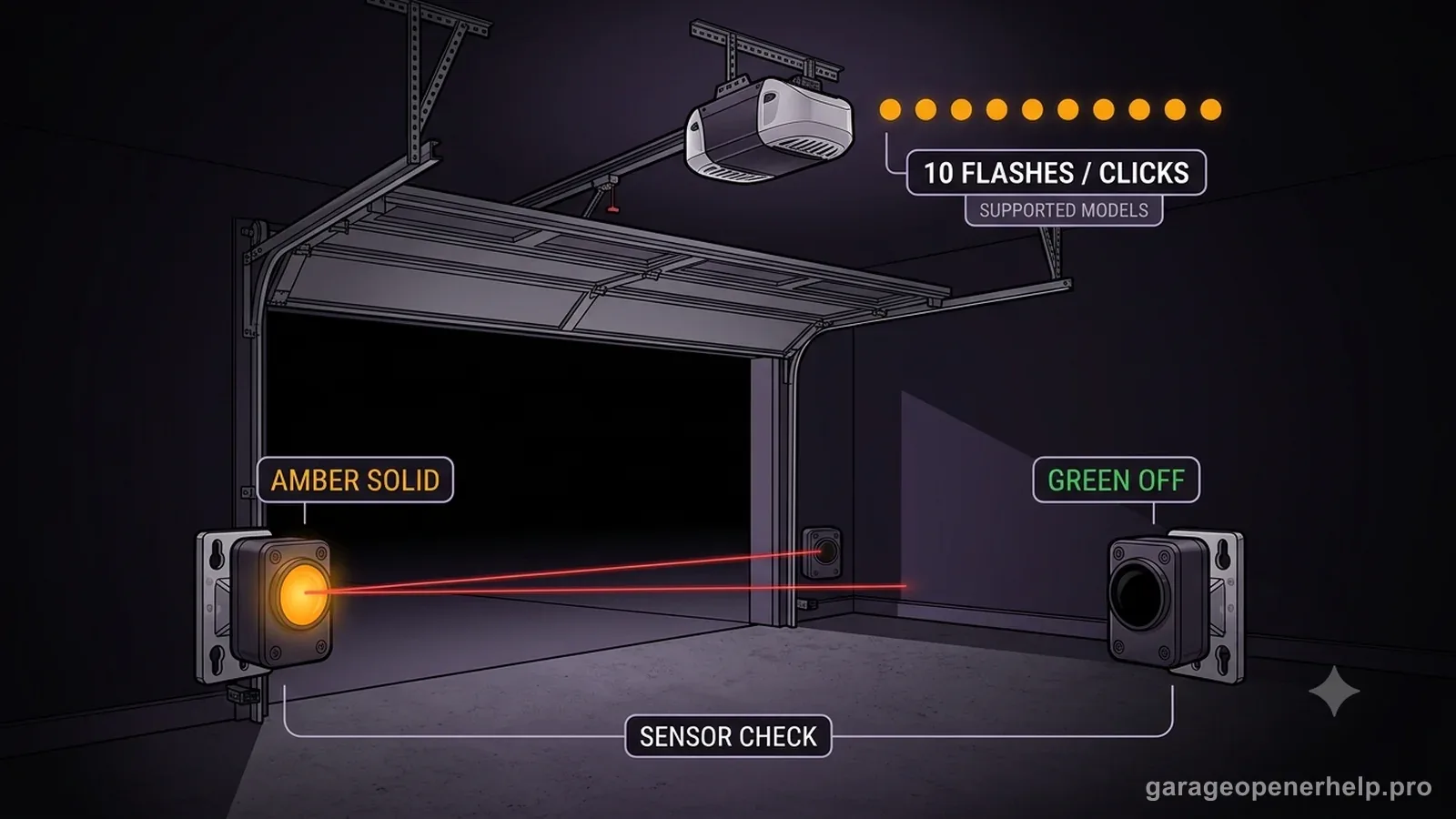
Diagnostic snapshot
- Answer
- On affected Chamberlain/LiftMaster openers, ten opener-light flashes commonly point to the safety-reversing sensor circuit, but this indication is not universal on newer production.
- Check first
- Read both photo-eye LEDs before changing force or travel: note whether each LED is solid, off, dim, or flickering.
- Strong clue
- A stable sender with an off or flickering receiver strongly narrows the problem toward alignment, beam obstruction, or low-voltage sensor wiring.
- Model / generation note
- Chamberlain Group says units or replacement logic boards manufactured after February 3, 2022 may not use the same ten-flash feature.
Read the two safety-sensor LEDs as a pair
Is the sender powered, and is the receiver seeing the beam?
Steady + steady = aligned baseline
On current Chamberlain Group safety-sensor guidance, amber identifies the sending sensor and green identifies the receiving sensor. Both LEDs steady is the normal aligned baseline; an off or blinking green receiver moves diagnosis toward alignment, obstruction or receiving-side wiring depending on the exact state.
This exact manufacturer signal can feed the following diagnostic families. Keep the original code or LED pattern when troubleshooting.
What you are likely to notice
- Door opens but refuses to close from a remote
- Main opener light flashes ten times on affected models
- Sensor LEDs may be off, dim or flickering
Check these in order
1. Check the doorway
Remove boxes, tools, cobwebs or other objects from the sensor beam near the floor. Wipe dirty lenses with a soft dry cloth.
2. Read both sensor LEDs
A steady sending sensor with a dim, off or flickering receiving sensor usually points toward alignment, obstruction or wiring. Both dark can indicate power/wiring to the sensor circuit.
3. Re-align gently
The sensors should face each other across the opening and sit no higher than the manufacturer-specified height. Loosen only enough to aim the sensor; do not disturb door hardware.
4. Inspect low-voltage wire
Look for loose terminals, staples through the wire and visible breaks. Do not confuse the sensor wires with mains-voltage wiring.
Ten flashes are useful only when the opener generation matches
The ten-flash clue is widely repeated online, but it should not be treated as universal across every Chamberlain or LiftMaster opener. Chamberlain Group notes that garage door openers and replacement logic boards manufactured after February 3, 2022 no longer use this feature in the same way. That manufacturing note is why the opener model and production generation matter before you interpret the flash count.
For an affected unit, the light pattern gives you a reason to inspect the safety-reversing sensor circuit first. For a newer unit with different diagnostic behavior, use the LEDs, myQ diagnostics or the manual for the exact model rather than forcing the older ten-flash rule onto it.
Read the two sensor LEDs as a pair
Do not look at only one photo eye. A steady sending LED with a dim, flickering or dark receiving LED points toward a different branch than two dark sensors. Alignment, obstruction and wiring are all possible, but the paired LED state helps you decide where to inspect first.
After cleaning and aligning, test the safety-reversal system using the manufacturer’s procedure. A door that merely closes again is not enough proof that the system is safe. If the sensors cannot maintain a stable state, the problem should be corrected before normal remote operation resumes.
Ten flashes are a safety-system symptom, not a universal code
On Chamberlain/LiftMaster opener generations that use this behavior, ten opener-light flashes or clicks can accompany safety-sensor close faults such as the 1-1 and 1-2 diagnostic branches. The manufacturer's current diagnostic table also notes that openers or replacement logic boards manufactured after February 3, 2022 may no longer use this feature, so ten flashes should never be assumed across every generation.
If you do see the ten-flash pattern, pair it with the opener generation, any UP/DOWN code and the amber/green sensor LEDs. That combination is more useful than the flash count alone. Both LEDs off points toward installation/wiring; amber solid with green off or flickering keeps obstruction, alignment and receiving-eye wiring higher. Once the LEDs are normal, verify a normal close command and safety reversal instead of treating the light pattern as a standalone repair instruction.
- Confirm the opener generation actually uses the ten-flash safety indication.
- Pair the flashes with UP/DOWN code and sensor LED state.
- Do not use ten flashes as a cross-brand or all-generation diagnostic code.
Record the opener model/generation, whether the ten flashes repeat on every failed close, the UP/DOWN code if present and both sensor LEDs. This is especially important on newer hardware because Chamberlain notes that the older flash/click behavior is not universal after the 2022 logic-board change.
Stop DIY troubleshooting when…
- The door is crooked or off-track
- A spring/cable is damaged
- The opener has visible electrical damage
- Sensor correction does not restore safe reversal behavior
Garage door springs, cables and a falling/unbalanced door can store or release dangerous force. Those are door-system problems, not just opener settings.
Common questions
Does ten flashes always mean bad sensors?
No. On affected Chamberlain Group openers it commonly indicates a safety-sensor problem, but the fault can be obstruction, alignment, wiring or sensor hardware rather than automatically requiring new sensors.
Why can the wall button sometimes close the door anyway?
Some systems allow a continuous-hold wall-control behavior when the safety-sensor circuit is not satisfied. Treat it as a temporary diagnostic clue, not the normal way to operate the door.
What if both sensor lights are off?
Move toward power and wiring checks for the sensor circuit. Chamberlain publishes a separate diagnostic path for both LEDs being off.
Manufacturer sources used
These links are the factual baseline for the diagnostic claims above. Model-specific manuals can supersede general guidance.