Chamberlain Group’s LED table says amber on with green off indicates a wiring issue with the receiving sensor. Inspect the green-sensor connection and visible low-voltage wire, then use the manufacturer sensor test if alignment alone does not restore a steady green LED.
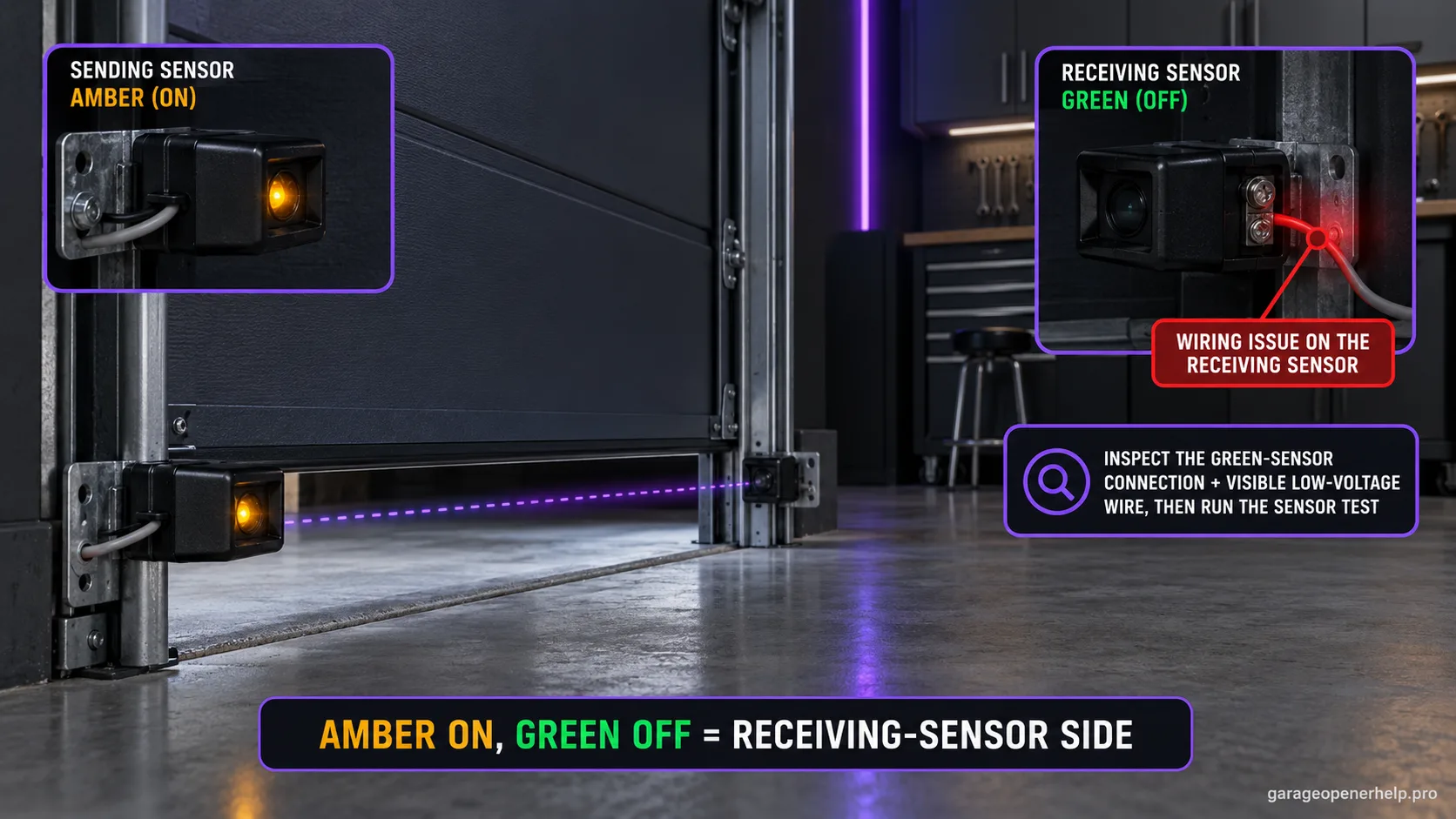
Diagnostic snapshot
- Answer
- If the Chamberlain/LiftMaster sending sensor is solid amber but the receiving sensor is off, power is reaching the sender but the receiving side is not confirming a usable beam.
- Check first
- Check receiver alignment, beam obstruction, the receiving sensor connection, and the visible low-voltage wire path.
- Strong clue
- The solid amber sender is useful because it makes a total sensor-circuit power loss less likely than when both LEDs are dark.
- Model / generation note
- This LED interpretation applies to the documented Chamberlain Group safety-sensor family; exact replacement parts still depend on opener generation/model.
Read the two safety-sensor LEDs as a pair
Is the sender powered, and is the receiver seeing the beam?
Steady + steady = aligned baseline
On current Chamberlain Group safety-sensor guidance, amber identifies the sending sensor and green identifies the receiving sensor. Both LEDs steady is the normal aligned baseline; an off or blinking green receiver moves diagnosis toward alignment, obstruction or receiving-side wiring depending on the exact state.
This exact manufacturer signal can feed the following diagnostic family. Keep the original code or LED pattern when troubleshooting.
What you are likely to notice
- The amber sending sensor glows steadily
- The green receiving sensor is dark
- The door will not close normally even though the sender appears powered
Check these in order
1. Verify the green sensor is the receiver
Chamberlain uses amber for the sending sensor and green for the receiving sensor on the documented sensor family. Identifying the correct side prevents rewiring the wrong eye.
2. Check obstruction and alignment once
Make sure the beam path is clear and aim the receiver at the sender. If the green LED remains off rather than merely flickering, wiring deserves more attention.
3. Inspect receiving-side wiring
Look for a loose terminal, nicked cable, pinched conductor or open/shorted wire on the green-sensor side. Chamberlain specifically ties a non-steady receiving LED to an open or shorted wire branch.
4. Replace only after wiring is separated from sensor failure
Chamberlain’s troubleshooting process uses wiring substitution/position checks to decide whether the cable or sensor is at fault. Do not assume a dark green LED automatically means both photo eyes need replacement.
The powered sender helps narrow the fault
A steady amber sender shows that one side of the sensor system is alive. When the green receiver is dark, Chamberlain's LED table specifically moves toward the receiving-sensor wiring branch instead of a system-wide both-off branch.
That does not prove the green sensor itself is defective. An open conductor, short, loose terminal or damaged cable can leave the receiver dark while the sender remains normal.
Why a green receiver can be off instead of blinking
A blinking green LED is typically an alignment/obstruction clue. A completely dark green LED is a stronger reason to inspect whether the receiver has a usable circuit connection. This difference matters because a blinking green receiver and a completely dark green receiver lead to different first checks.
Once the green LED returns steady, test the closing and safety-reversal behavior. A light that comes on briefly is not enough if it flickers during operation.
Amber steady proves more than it seems
When the sending amber LED is steady but the receiving green LED is off, Chamberlain's current sensor guidance keeps the fault on the receiving side, beam path or receiving-eye wiring rather than the entire sensor circuit. The same manufacturer material lists obstruction and misalignment alongside a cut/broken receiving-eye wire as common possibilities for this state.
That is why simply twisting the green sensor until it lights is not a complete diagnosis. Remove beam obstructions, verify bracket alignment and inspect the visible receiving-side wire. If the green LED remains off, document whether a short-wire test or sensor swap is appropriate for the exact sensor generation; newer 041-0136 sensors have model-specific instructions. Stop before any test that requires unsafe access or uncertain wiring work.
- Amber solid + green off: receiving-eye/beam-path branch.
- Amber solid + green flicker: slight alignment/obstruction becomes more likely.
- Both off: use the no-power/wiring branch instead.
If the green LED remains off, document whether the amber sender stays solid, whether the receiving eye ever lights when the beam is clear, and whether the visible receiving-side wire has damage or a loose connection. If the sensor generation is identifiable, include that too; Chamberlain has generation-specific guidance and a service note should not assume every photo eye is wired identically.
Stop DIY troubleshooting when…
- The wire fault is hidden or inaccessible
- The receiving sensor housing is damaged
- The terminal block is damaged
- The door has an unrelated mechanical safety problem
Garage door springs, cables and a falling/unbalanced door can store or release dangerous force. Those are door-system problems, not just opener settings.
Common questions
What does amber on and green off mean on Chamberlain sensors?
Chamberlain's LED table points to a wiring issue with the green receiving sensor.
Is the green sensor always the receiver?
On the documented Chamberlain sensor family, amber identifies the sending sensor and green identifies the receiving sensor.
Should I replace the green sensor immediately?
No. Check alignment and the receiving-side wiring first, because a dark green LED can be caused by an open or shorted wire.
Manufacturer sources used
These links are the factual baseline for the diagnostic claims above. Model-specific manuals can supersede general guidance.